

As a supplier of DP Type Density Meters, I understand the frustration that comes with a density meter failing to start. This issue can disrupt operations and lead to delays in various industries where accurate density measurements are crucial. In this blog post, I will guide you through the troubleshooting process to help you get your DP Type Density Meter up and running again.
1. Initial Checks
Before diving into complex troubleshooting steps, it's essential to perform some basic checks. These simple steps can often identify and resolve the problem quickly.
Power Supply
- Verify the Power Source: Ensure that the density meter is properly connected to a reliable power source. Check if the power cord is plugged in securely and if the outlet is functioning correctly. You can use a multimeter to measure the voltage at the power input of the meter. The voltage should match the specifications provided in the user manual.
- Check the Fuse: If the meter has a fuse, inspect it to see if it has blown. A blown fuse can prevent the meter from receiving power. Replace the fuse with a new one of the same rating if necessary.
Sensor Connections
- Inspect the Wiring: Examine the wiring between the sensor and the meter. Look for any loose connections, damaged wires, or signs of corrosion. Tighten any loose connections and replace any damaged wires. Make sure that the wiring is properly grounded to avoid electrical interference.
- Check the Sensor Mounting: Ensure that the sensor is correctly mounted in the process pipeline. A misaligned or loose sensor can cause inaccurate readings or prevent the meter from starting. Refer to the installation manual for the correct mounting procedure.
2. Software and Configuration
Sometimes, issues with the meter's software or configuration can prevent it from starting. Here are some steps to troubleshoot these aspects.
Reset the Meter
- Factory Reset: If the meter has a reset button or a reset function in the menu, perform a factory reset. This will restore the meter to its default settings and may resolve any software glitches. However, be aware that a factory reset will erase all custom settings, so make sure to back them up before proceeding.
- Update the Firmware: Check if there are any firmware updates available for the meter. Outdated firmware can cause compatibility issues and other problems. Visit the manufacturer's website to download the latest firmware and follow the instructions to install it.
Configuration Settings
- Verify the Input Parameters: Double - check the input parameters such as the measuring range, unit of measurement, and output signal settings. Incorrect settings can cause the meter to malfunction or fail to start. Refer to the user manual for the correct configuration values.
- Check the Communication Settings: If the meter is connected to a control system or other devices via communication protocols such as Modbus or HART, ensure that the communication settings are correct. Check the baud rate, parity, and address settings to ensure proper communication.
3. Sensor Issues
The sensor is a critical component of the DP Type Density Meter, and problems with it can lead to startup failures.
Sensor Calibration
- Check the Calibration Status: Determine if the sensor is calibrated correctly. An uncalibrated sensor can provide inaccurate readings or prevent the meter from starting. Refer to the calibration procedure in the user manual and perform a calibration if necessary. You may need to use a calibration standard or a reference sample to calibrate the sensor accurately.
- Sensor Contamination: Over time, the sensor can become contaminated with debris, scale, or other substances. This can affect its performance and prevent the meter from starting. Clean the sensor according to the manufacturer's instructions. Use appropriate cleaning agents and tools to avoid damaging the sensor.
Sensor Damage
- Physical Inspection: Inspect the sensor for any signs of physical damage such as cracks, dents, or corrosion. A damaged sensor may need to be replaced. Contact the manufacturer or your supplier for a replacement sensor and follow the installation instructions carefully.
- Sensor Aging: Sensors can degrade over time due to normal wear and tear. If the sensor is old and has been in use for a long time, it may be experiencing performance issues. Consider replacing the sensor to ensure accurate and reliable measurements.
4. External Factors
External factors can also impact the startup of the DP Type Density Meter.
Process Conditions
- Flow Rate and Pressure: Ensure that the flow rate and pressure in the process pipeline are within the acceptable range for the meter. High or low flow rates and pressures can cause the meter to malfunction or fail to start. Refer to the meter's specifications for the recommended flow rate and pressure limits.
- Temperature: Extreme temperatures can affect the performance of the meter and its sensor. Make sure that the process temperature is within the operating range of the meter. If necessary, use insulation or cooling/heating devices to maintain the appropriate temperature.
Environmental Conditions
- Humidity and Dust: High humidity and dust can cause electrical problems and damage to the meter. Ensure that the meter is installed in a clean and dry environment. If necessary, use a protective enclosure to shield the meter from moisture and dust.
- Vibration and Shock: Excessive vibration and shock can loosen connections and damage the meter. Mount the meter in a stable location away from sources of vibration and shock. Use vibration - damping mounts if necessary.
5. Seek Professional Help
If you have followed all the above steps and the meter still fails to start, it may be time to seek professional help. As a DP Type Density Meter supplier, we have a team of experienced technicians who can provide on - site support, diagnostic services, and repair solutions.
We offer a wide range of Online Density Transmitter, Online Liquid Density Meter, and Top Mounted Online Density Meter to meet your specific needs. Our products are known for their high accuracy, reliability, and durability.

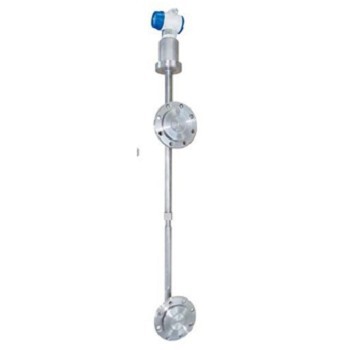
If you are experiencing issues with your DP Type Density Meter or are interested in purchasing a new one, please contact us. We will be happy to assist you with any questions or concerns you may have and provide you with the best solutions for your density measurement requirements.
References
- Manufacturer's User Manual for DP Type Density Meter
- Industry Standards for Density Measurement
- Technical Bulletins on Density Meter Troubleshooting


